Self Storage Website Best Practices: 12 Things That Break, and How to Test Them Tonight
· Storagely Team · 13 min read · Updated
12 self storage website best practices, each with a 2-minute pass/fail test. Find the silent failures that cost online rentals before renters do.
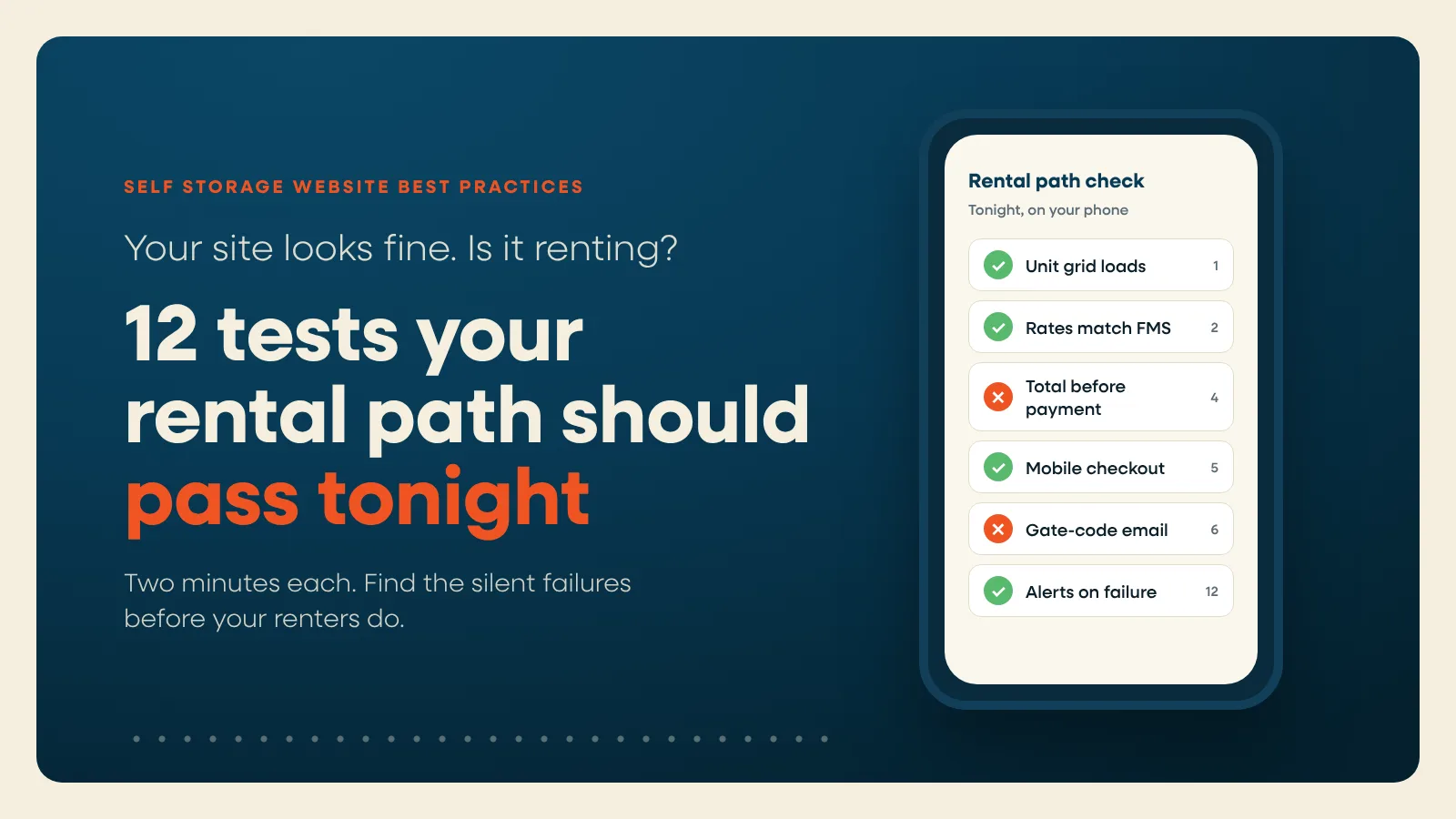
Most best-practice lists tell you what to add to your self storage website. This one is about what breaks.
A storage website can look fine on your office computer and still lose rentals all night. The unit grid goes blank. The web rate on the page doesn't match the rate at checkout. The Rent button sits under a chat bubble on a phone. The confirmation email with the gate code never arrives. Nobody calls to tell you. They rent from the facility down the road.
Every page on your site should end in a rental. Most lost move-ins happen between the click and the completed rental, on the website itself. That's also the part you can test yourself, tonight, in about 30 minutes.
Below are 12 practices. Each one comes with a pass/fail test that takes about two minutes. After that you'll find a full "test your rental path tonight" walkthrough, a score sheet, and a maintenance schedule so the fixes stay fixed. For design choices like unit grid layout, photos and location pages, see our guide to self storage website design.
Why silent failures cost more than bad design
Bad design loses some renters. A broken rental path loses all of them, and you don't see it happen.
Online retail gives a sense of scale. Baymard Institute's running average of 50 studies puts online cart abandonment at 70.22% (Baymard, updated September 2025). Storage checkouts aren't retail carts, and we're not saying storage has the same rate. The point is that most people who start an online purchase don't finish, even when everything works. When something breaks, the few who would have finished leave too.
Silent failures share three traits:
- The page still loads, so uptime monitors say all is well.
- Analytics still records visits, so traffic looks normal.
- The renter doesn't complain. They leave.
That's why every test below is something you do as a renter, on a phone. Not something you read off a dashboard.
Before you start: set up like a renter
- Use your phone on cellular data, not office Wi-Fi.
- Open a private (incognito) window, so you're not logged in and nothing is cached.
- Keep your facility management software (FMS) open on a laptop beside you.
- Pick one location. Repeat for the others later.
The 12 self storage website best practices, with a test for each
1. The unit grid loads fast on a phone
The unit grid is where renting starts. If it's a widget pulled in from another system, it can fail while the rest of the page looks fine.
The 2-minute test: Open a location page on your phone. Count the seconds until real unit sizes and prices appear. Then tap a size filter and watch how fast the list responds.
- Pass: Prices appear in about 2.5 seconds or less. Filters respond right away.
- Fail: A spinner, a blank box, "no units available" when you have vacancies, or a filter that lags.
For real numbers, run the page through PageSpeed Insights. Google rates a page "good" when Largest Contentful Paint is 2.5 seconds or less and Interaction to Next Paint (INP) is 200 milliseconds or less, measured at the 75th percentile of real visits (web.dev, updated May 2025). INP matters most on unit grids, because renters tap filters and sizes.
2. Web rates match everywhere
Stale rates are easy to miss, because every copy of a price looks right on its own. The trouble only shows when you put them side by side.
The 2-minute test: Pick three units. Write down the price on the location page, on the unit card and in the checkout summary. Compare all three with your FMS.
- Pass: All four numbers match, and every promo on the page is still running.
- Fail: Any mismatch, or a promo that has ended.
Fix it at the source, not page by page. On Storagely, Rentals reads pricing and availability live from your FMS, and Atlas holds each promo once for every location it applies to, so an ended promo comes down everywhere at once.
3. Availability is real
The 2-minute test: In your FMS, find one size that's sold out and one with vacancies. Look up both on your website.
- Pass: The sold-out size can't be rented (or offers a waitlist). The open size can.
- Fail: Renters can pay for a unit you don't have, or can't rent one you do.
Both cost you. The first creates a refund and an angry call. The second loses the rental outright.
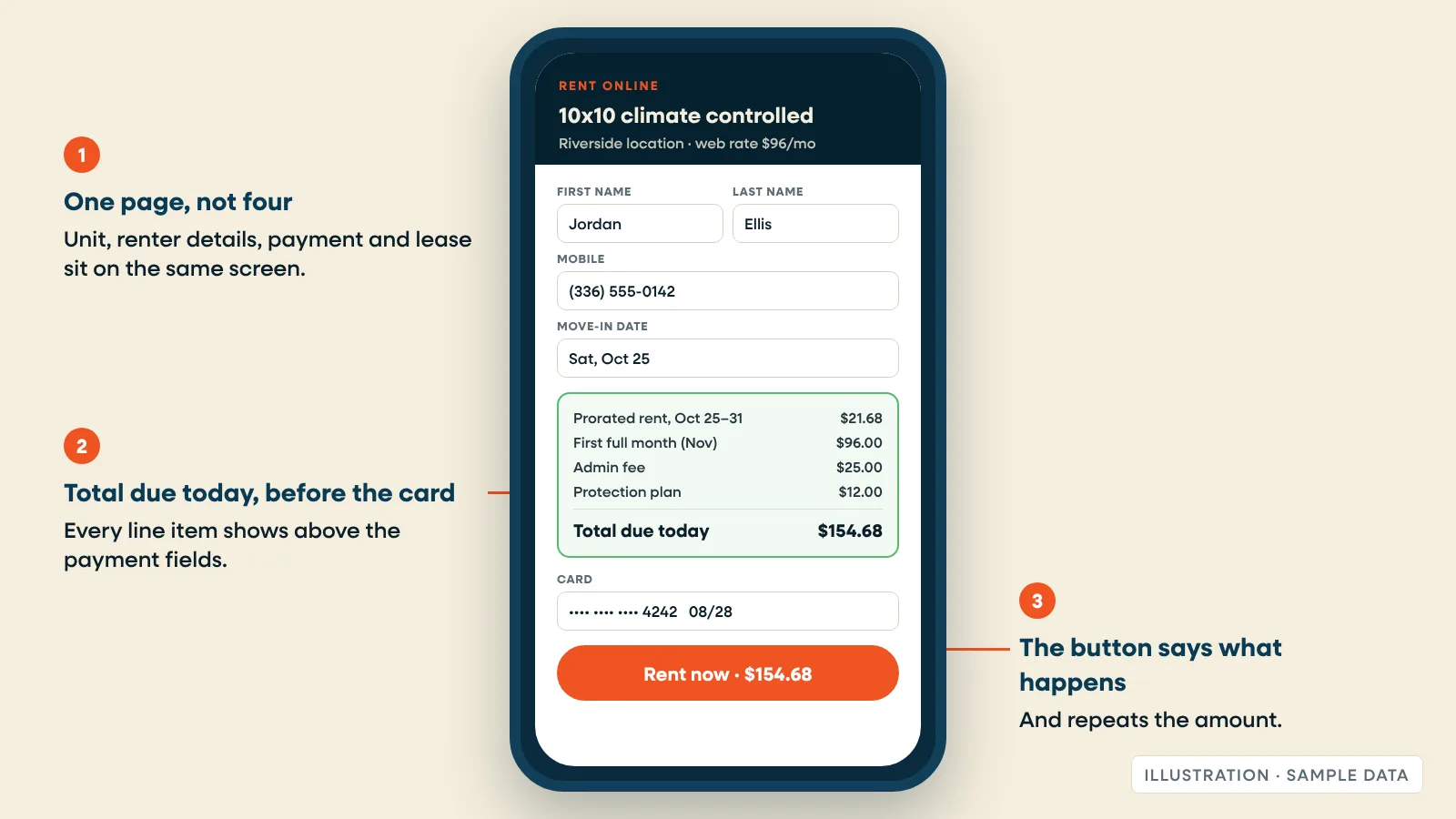
4. The total due today shows before payment
Renters expect to see what they'll pay before they type a card number. Storage has more line items than most purchases: first month, prorated rent, admin fee, protection plan or insurance, deposit and tax.
The 2-minute test: Start checkout on a 10x10. Stop before you enter payment.
- Pass: The total due today is visible and itemized above the payment fields.
- Fail: The total appears only after the card is entered, or fees show up late.
5. Checkout works on a phone, start to finish
The 2-minute test: Complete a reservation on an iPhone and on an Android phone. Count every field and every page. Check for:
- The right keyboard (a number pad for phone and ZIP).
- Autofill that works for name, address and card.
- Nothing covering the form: chat bubbles, cookie banners, sticky headers.
- Error messages that name the field and say what's wrong.
Results:
- Pass: You finish with no zooming, no dead ends and no retyping.
- Fail: Any field you had to fight.
Every extra page is one more place to drop out. Storagely's Rentals checkout puts the unit, renter details, payment and lease on one page, and a rental takes about 60 seconds. Which sections appear depends on your settings and on what your FMS accepts.
6. Confirmation and gate-code messages arrive
This is the failure operators tend to find last, usually when a new tenant calls at 9 p.m. from a locked gate.
The 2-minute test: After your test reservation or rental, time how long the email and text take. Check spam. Read the message the way a renter would.
- Pass: It arrives within a few minutes, in the inbox, with everything needed to move in: unit number, gate code or how to get it, address, access hours, office hours, what to bring and a link to the lease.
- Fail: It's late, lands in spam, or is missing the gate code or access hours.
If messages land in spam, ask whoever manages your domain to check the SPF, DKIM and DMARC records for the address that sends confirmations.
7. A renter who leaves halfway gets a reason to come back
The 2-minute test: Start checkout, enter your email and phone number, then close the tab. Check again tomorrow.
- Pass: You get a reminder that links back to the same unit at the same price.
- Fail: Nothing arrives.
Storagely's abandoned rental recovery (Growth plan and up) sends that nudge automatically.
As of 2025, Storagely customers had recovered a lifetime value of $6,516,000 from abandoned rentals (Storagely data).
8. Renters who aren't ready have somewhere to go
Not everyone rents on the first visit. Some are moving in three weeks. Some want a size you're out of.
The 2-minute test: Can a renter hold a unit without paying the first month? Does a sold-out size offer a waitlist?
- Pass: Yes to both.
- Fail: The only choices are "pay now" or "call us."
Storagely Rentals includes reservations. Waitlist units are on the Growth plan and up.
9. Hours, address and phone match Google
Ask an operator with a few dozen locations where their hours live, and you'll often hear four places: the FMS, Google, the website and a spreadsheet. Renters believe whichever one they see first.
The 2-minute test: Compare your location page with your Google Business Profile and your FMS. Check office hours, access hours, holiday hours, phone and address.
- Pass: Identical everywhere.
- Fail: Any difference, especially in access hours.
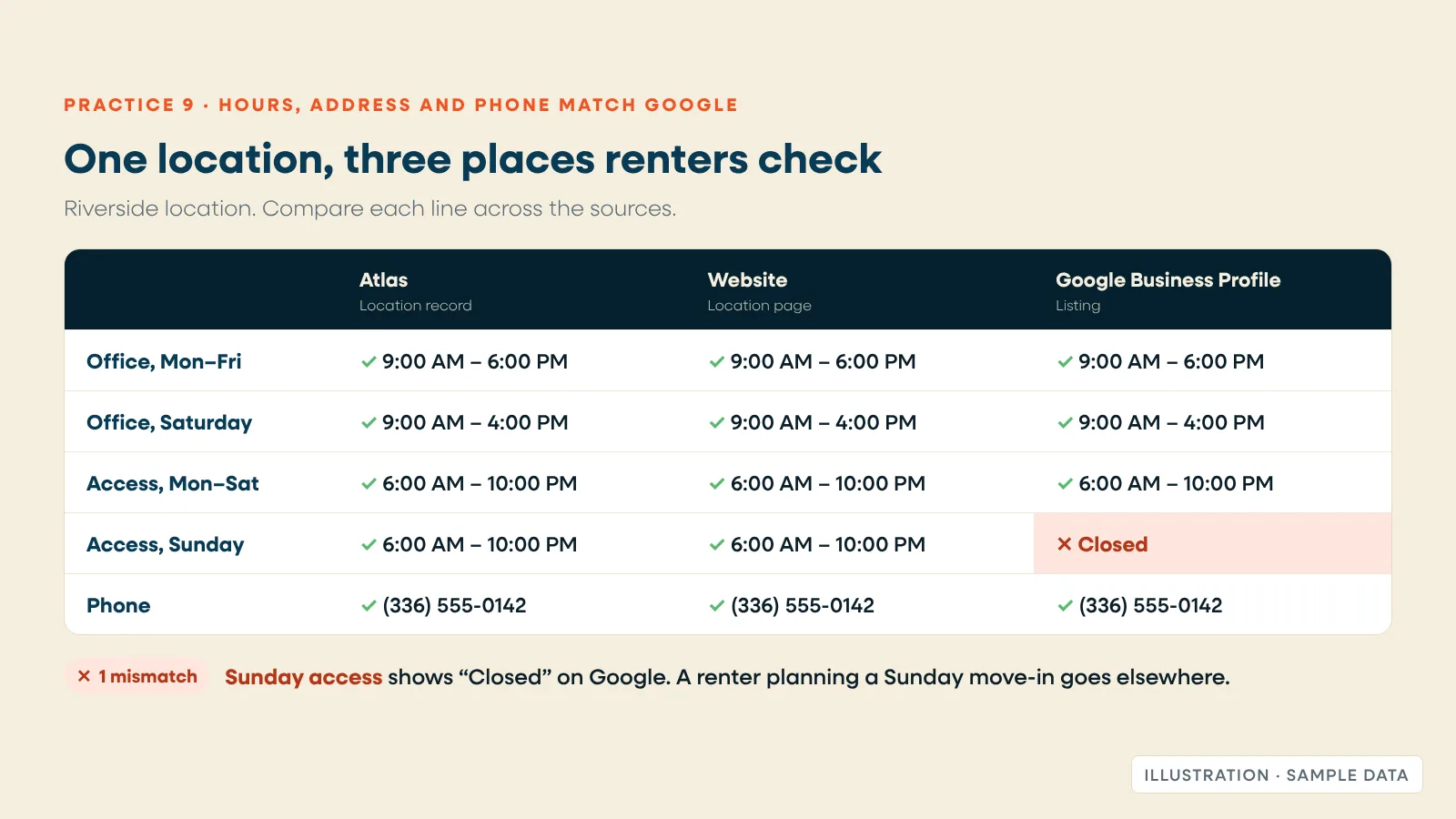
Atlas keeps hours, photos, amenities, FAQs and promos for every location in one place. Connect your Google Business Profile, and edits made there land on your pages automatically.
10. The first thing a renter can tap is Rent or Reserve
The 2-minute test: Open a location page on your phone. Without scrolling, can you see a price and a button that rents or reserves?
- Pass: Yes, and the button names the action ("Rent Now," "Reserve").
- Fail: The first button says "Learn More" or "Contact Us," or the price sits below a full-screen photo.
The basics from our older checklists still hold: real photos of your facility, not stock; a short FAQ that answers access hours, payment and insurance; and clear unit sizes. They just come after the button, not before it.
11. The rental path meets WCAG 2.2 AA basics
The Department of Justice's 2022 guidance says the ADA applies to businesses open to the public, including their websites, and points to the Web Content Accessibility Guidelines (WCAG) as a reference (ADA.gov, March 2022). WCAG 2.2 became a W3C Recommendation on October 5, 2023, adding nine success criteria (W3C, 2023). This isn't legal advice, so ask your attorney about your own obligations.
Accessibility overlaps with conversion, too. A form that works with a keyboard usually works better with a thumb.
The 2-minute test (on a laptop): Put the mouse away. Press Tab to move through a location page and checkout.
- Can you reach every filter, field and the pay button?
- Can you always see which element has focus, or does a sticky header or chat widget cover it? (Criterion 2.4.11, Focus Not Obscured)
- Are buttons and links big enough to tap? Level AA asks for at least 24 by 24 CSS pixels (Criterion 2.5.8, Target Size, W3C 2023).
- Does checkout make renters type the same details twice? (Criterion 3.3.7, Redundant Entry)
- Does signing in to pay require a puzzle or memory test? (Criterion 3.3.8, Accessible Authentication)
- Do photos have alt text, and do form errors use words, not just red borders?
Pass means yes to every question. Fix any "no" on the checkout page first.
12. You find out before your renters do
The 2-minute test: Answer one question. If checkout broke at 9 p.m. on a Friday, when would you know?
- Pass: Within the hour, from an alert.
- Fail: Monday, from a tenant. Or never.
While you're at it, check that a completed rental still appears in your reports with its marketing source. A broken tracking tag is a silent failure too: rentals keep coming, but you can't tell which marketing paid for them.
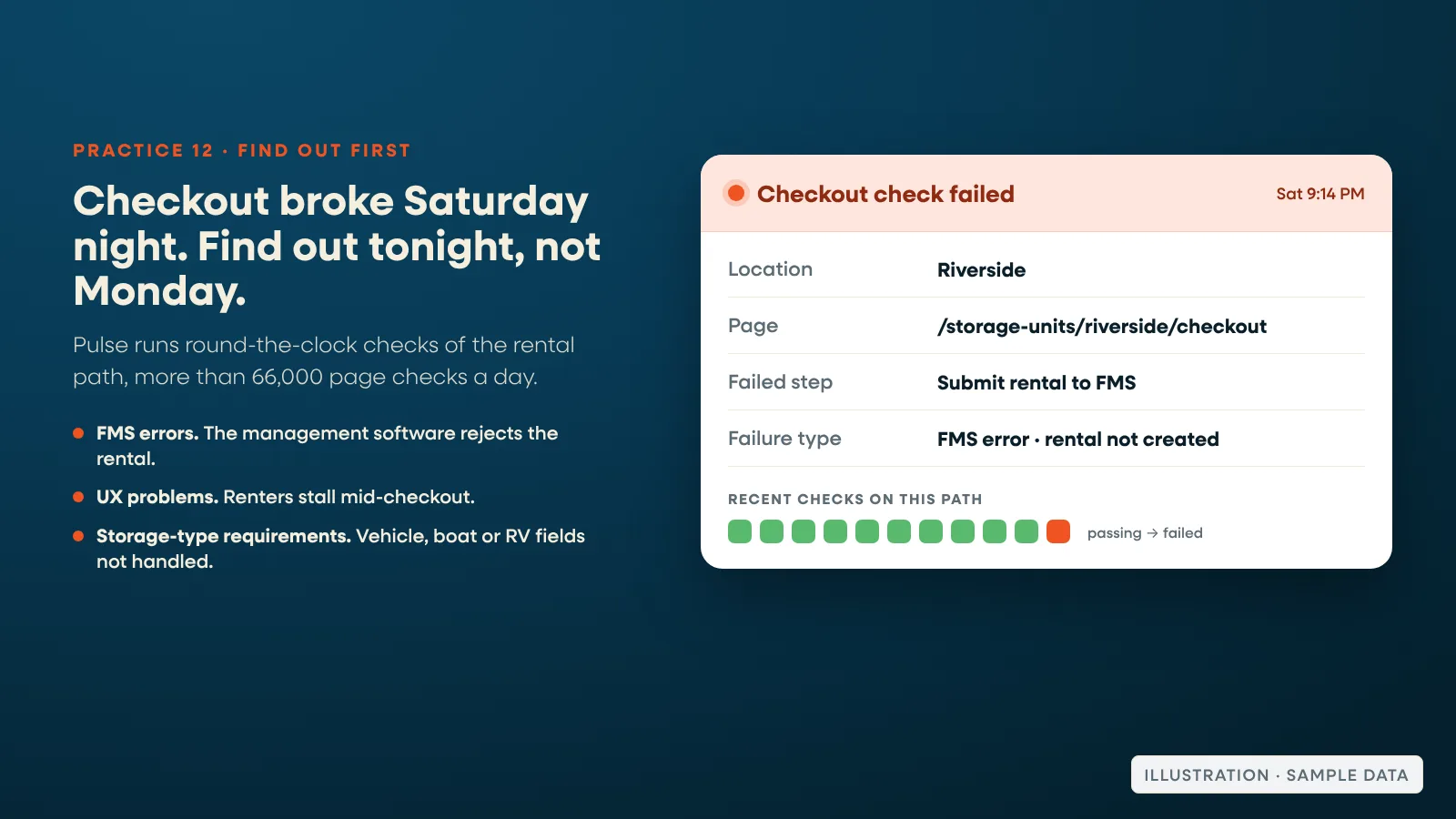
On Storagely, Pulse runs round-the-clock checks of the rental path, more than 66,000 page checks a day, and alerts the team when checkout breaks.
In Storagely's Pulse data (2026), the checkout failures it flags most often fall into three groups: errors coming back from the facility management software, so a rental can't be created; user-experience problems that stall renters mid-checkout; and conditional requirements for unique storage types, such as a vehicle, boat or RV rental that needs a VIN, registration or proof of insurance and blocks when those fields aren't handled.
Test your rental path tonight: a 30-minute walkthrough
Do this once for each location, then weekly on a rotating location. Keep your FMS open and mark each result in the score sheet below.
- Search like a renter. On your phone, search Google for "storage units near [your town]" and for your facility name. Click your organic listing, then the website link on your Google Business Profile. Note where each one lands.
- Time to price. Count the seconds until real prices appear. (Practice 1)
- Check three prices against your FMS. (Practice 2)
- Check one sold-out size and one open size. (Practice 3)
- Start checkout on a 10x10. Count fields and pages. Confirm the total due today shows before payment. (Practices 4 and 5)
- Complete a reservation, or a test rental your manager agrees to reverse in your FMS afterward. Agree on this before you start.
- Check your inbox and texts. Time them, and read the gate-code instructions. (Practice 6)
- Check your FMS. Did the reservation or lease land with the right unit, rate and move-in date?
- Check your reports. Does the reservation show up with its marketing source? (Practice 12)
- Abandon one checkout after entering your email. See whether a reminder arrives tomorrow. (Practice 7)
- Repeat steps 2 to 7 on a laptop, keyboard only. (Practice 11)
Score sheet
| # | Practice | Pass / Fail | Notes | Owner | Fix by |
|---|---|---|---|---|---|
| 1 | Unit grid loads fast on a phone | ||||
| 2 | Web rates match everywhere | ||||
| 3 | Availability is real | ||||
| 4 | Total due today shows before payment | ||||
| 5 | Checkout works on a phone | ||||
| 6 | Confirmation and gate-code messages arrive | ||||
| 7 | Abandoned checkouts get a reminder | ||||
| 8 | Reservations and waitlist available | ||||
| 9 | Hours, address and phone match Google | ||||
| 10 | Rent or Reserve is the first tap | ||||
| 11 | WCAG 2.2 AA basics on the rental path | ||||
| 12 | Alerts before renters notice; rentals tracked |
Reading your score (our rule of thumb, not an industry benchmark): 12 of 12, keep to the schedule below. 9 to 11, fix the fails this month, checkout items first. 8 or fewer, your rental path is likely costing you move-ins right now; start with practices 4, 5, 6 and 12.
Maintenance cadence: daily, weekly, quarterly
Most of these failures come back after a change, not on their own. Put the checks on a calendar. For the SEO side of that calendar, use our full SEO checklist.
| How often | What to check | Who | Time |
|---|---|---|---|
| Daily | Automated rental path checks with alerts (Pulse, on Storagely). Compare online rentals and reservations with the same weekday last week; a drop to zero is a signal, not a slow day. | Automated, plus the manager | 2 minutes |
| Weekly | One full mobile reservation on a rotating location (walkthrough steps 2 to 8). Spot-check three rates per location against your FMS. Confirm promo end dates. | Manager or marketing | 20 minutes |
| Quarterly | Full 12-practice audit per location. Keyboard and accessibility pass. PageSpeed Insights on location pages. Photos, FAQs and upcoming holiday hours in Atlas and on Google. Scorecard site health review. | Marketing lead | About 30 minutes per location |
| After any change | Rerun the walkthrough after an FMS update, rate change, new promo, site edit or new third-party script. | Whoever made the change | 30 minutes |
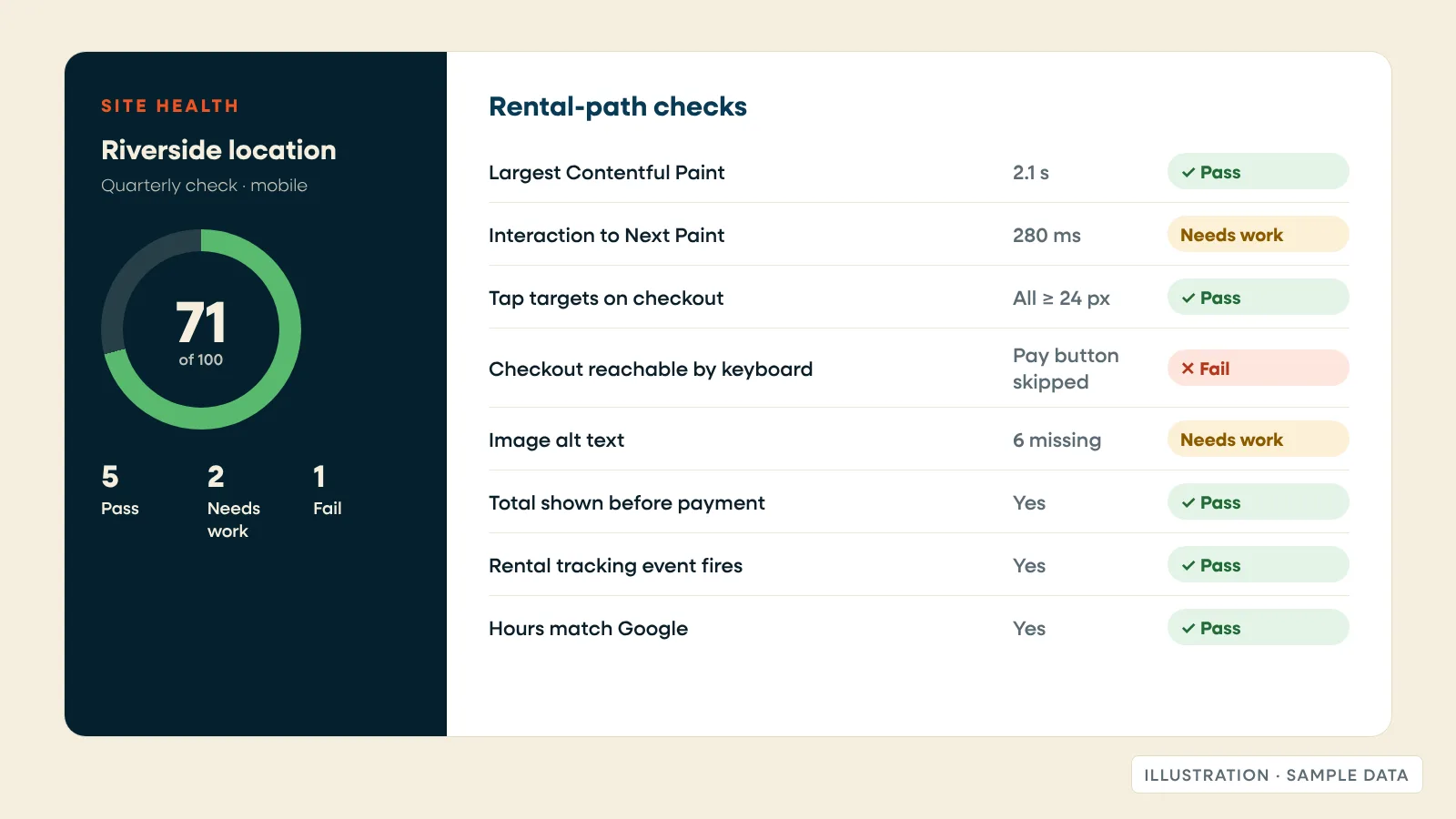
Where Storagely fits
We build the part of the funnel this guide tests: the website, the unit grid and the checkout.
- Rentals: one-page checkout, about 60 seconds to rent, with pricing and availability read live from your FMS. Included in every plan, from Lite at $99 per location per month.
- Atlas: one place for each location's details, synced with Google Business Profile.
- Abandoned rental recovery, waitlist units, value-based pricing and recurring service upsells: on Growth, $399 per location per month.
- Scorecard: 19 reports on traffic, rankings, AI visibility, reviews and site health.
- Pulse: round-the-clock checks of the rental path, with alerts.
- Integrations: SiteLink, storEDGE, Self Storage Manager, QuikStor, Monument and Cubby.
Every price is published on our pricing page (as of October 2026), and plans run month to month.
Your next step: Run the free Scorecard scan on one location. It checks rental friction, website health, search visibility and reviews, and shows your score before asking for contact details. Or book a demo, and we'll run a live rental through your own setup.
Frequently asked questions
What are the most important self storage website best practices?
Make every page end in a rental. That means a unit grid that loads fast on a phone, rates and availability that match your facility management software, the total due today shown before payment, a checkout that works on a phone, confirmation messages that include the gate code, and alerts when any of it breaks.
How often should I test my self storage website's rental path?
Run automated checks daily, one full mobile reservation each week on a rotating location, and a full audit every quarter. Also rerun the test after any change to rates, promos, your facility management software or the website itself.
How fast should a self storage online rental be?
Google rates a page "good" when Largest Contentful Paint is 2.5 seconds or less and Interaction to Next Paint is 200 milliseconds or less for 75% of visits (web.dev, 2025). For checkout, use as few pages and fields as your management software allows. Storagely's one-page checkout takes about 60 seconds.
Does my self storage website need to meet accessibility standards?
The Department of Justice's March 2022 guidance says the ADA applies to businesses open to the public, including their websites, and points to WCAG as a reference. WCAG 2.2, published in October 2023, is the current version. Start with keyboard access, visible focus, tap targets of at least 24 by 24 pixels and labeled checkout fields. This isn't legal advice.
What should a self storage confirmation email include?
The unit number, the gate code or how to get it, the address, access hours, office hours, what to bring and a link to the lease. It should arrive within minutes and land in the inbox, so check the SPF, DKIM and DMARC records for the sending address.
Related reading: Conversion elements every storage facility website must have · The five self-storage website questions operators asked us most · How is AI search affecting your self storage site traffic?