Self Storage SEO Checklist: What Your Platform Handles, What You Do Once, What You Do Monthly
· Storagely Team · 16 min read · Updated
A self storage SEO checklist sorted by who does each item: your platform, you once, or you monthly. Includes schema code and a downloadable sheet.
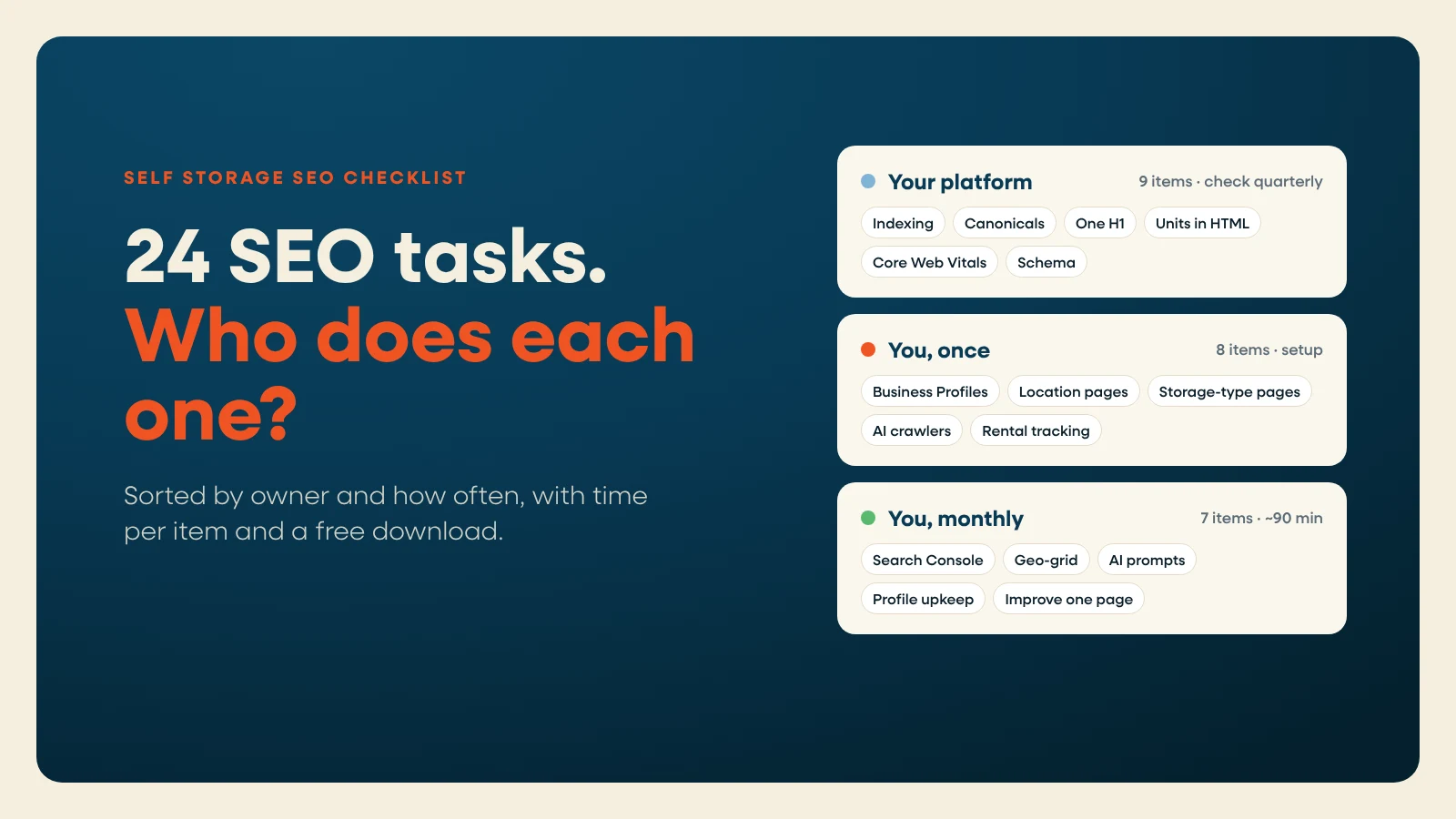
Most self storage SEO checklists hand you 50 tasks and no idea who should do them. So operators spend Saturday fixing canonical tags, a job their website platform should have done, and skip the work only they can do, like writing a location page that sounds like their facility.
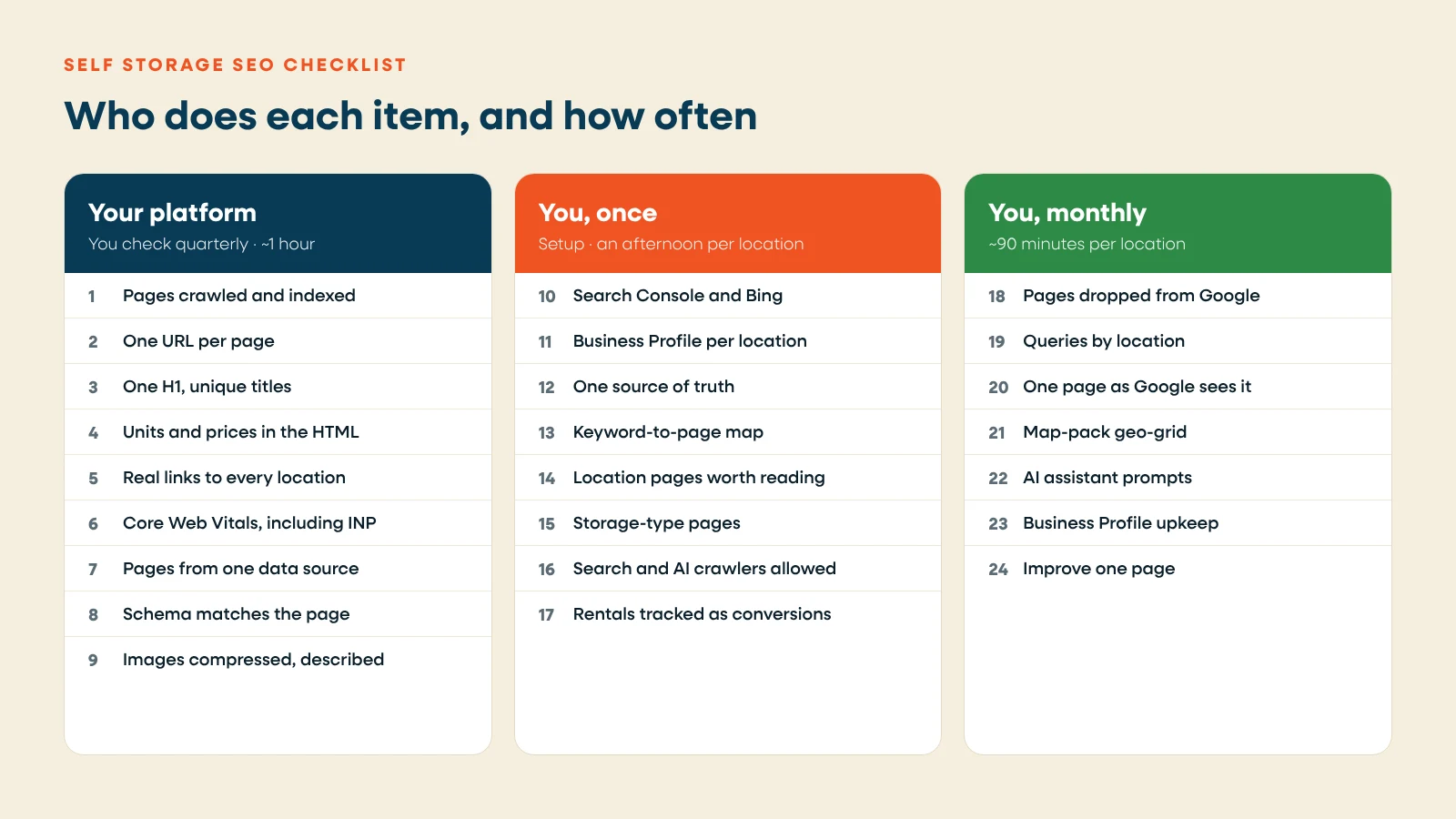
This checklist is sorted by who does each item:
- Your platform should handle this. You don't do these. You check them once a quarter, and if one fails, you open a ticket.
- You do this once. Setup work that pays off for years.
- You do this monthly. About 90 minutes a month for one location.
Every item lists an owner and a time estimate. The times are our estimates for one location, not industry benchmarks. A sortable copy of the whole list is free to download at the end, no email needed.
One rule runs through all of it: every page should end in a rental. Rankings bring renters to a page. The page still has to rent them a unit. For the rental side, see our self storage website best practices.
Part 1: Your platform should handle this
These are technical items. A storage-specific website platform should build them in. Your job is to confirm they work. Total check time is about an hour a quarter.
1. Pages can be crawled and indexed
Owner: platform. Check: 5 minutes.
Every location, city and storage-type page should be open to search engines. That means no stray noindex tags, nothing important blocked in robots.txt, and every page listed in an XML sitemap.
Check it: In Google Search Console, open Indexing, then Pages. Every location page should show as indexed. Then visit yoursite.com/robots.txt and confirm it lists your sitemap.
2. One URL per page
Owner: platform. Check: 5 minutes.
http and https, www and non-www, with and without a trailing slash: each page should resolve to one version. The others should redirect to it with a 301, and each page should carry a canonical tag pointing at itself.
Check it: Type your homepage four ways (with and without www, with and without https). All four should land on the same address.
3. One H1 and a unique title on every location page
Owner: platform. Check: 5 minutes.
Each location page needs one H1 that names the facility and its town, plus its own title tag and meta description. Templates often stamp the same title on every location, or hide two H1s inside a header and a hero.
Check it: In a desktop browser, right-click a location page and choose View Page Source. Search for "<h1". You should find exactly one.
4. Units and prices are in the HTML, not only in a widget
Owner: platform. Check: 10 minutes.
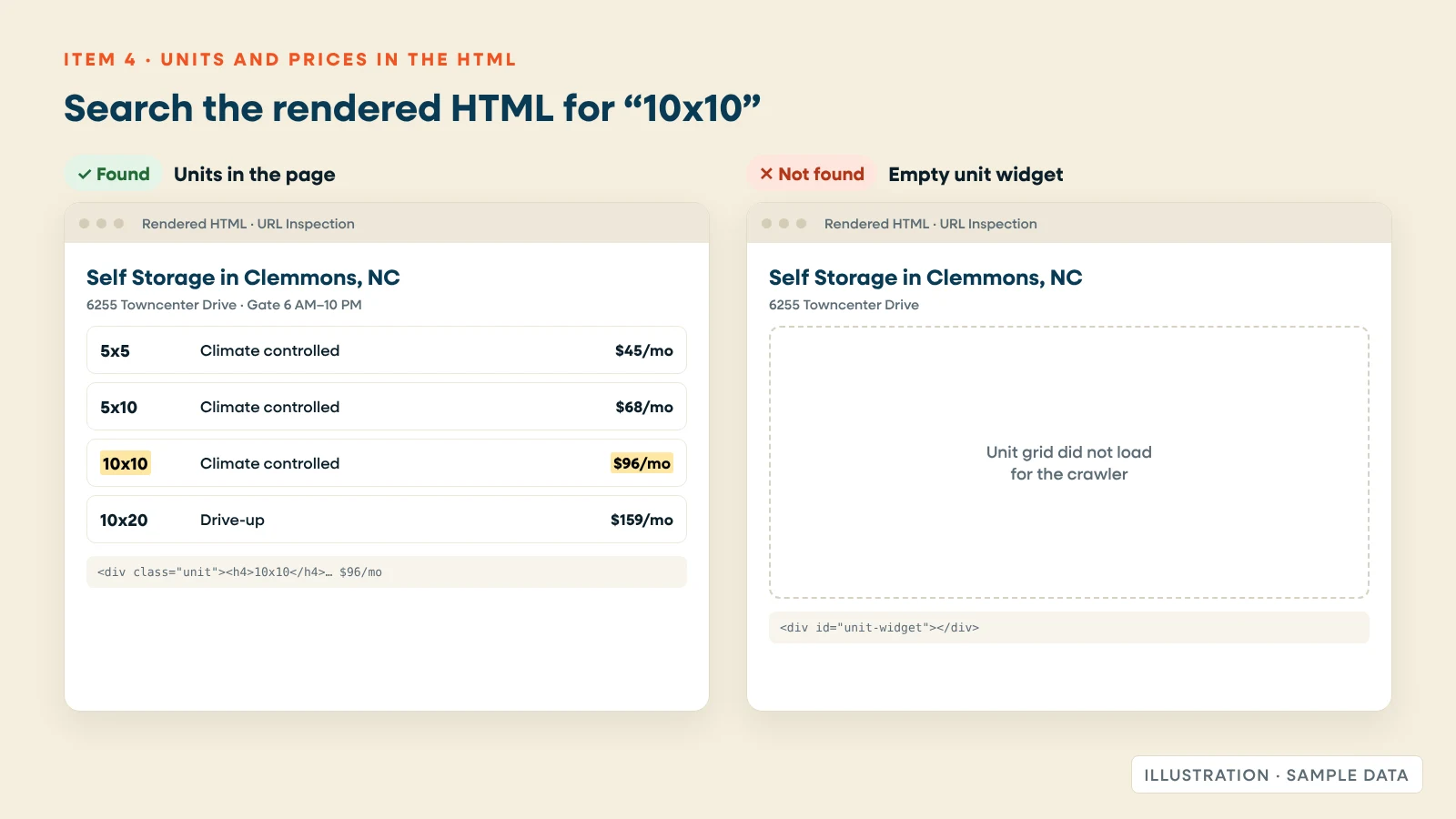
This is the storage-specific item most checklists skip. Many storage sites load the unit grid from the facility management software through a script or an embedded frame. To a renter, it looks fine. To a search engine, the page can be a heading, a photo and an empty box.
Google does run JavaScript, but in a later rendering step, and the page "may stay on this queue for a few seconds, but it can take longer than that." Google still calls server-side or pre-rendering "a great idea," because not every bot runs JavaScript (Google Search Central, updated March 2026). That includes some AI search crawlers.
What's at stake: unit sizes, storage types and prices are the words renters search for. "10x10 climate controlled storage in Clemmons" only matches your page if those words are on it when it's crawled.
Check it: In Search Console, paste a location page into URL Inspection. Click Test Live URL, then View Tested Page. Search the rendered HTML for a unit size, like "10x10", and a price. Then open the Screenshot tab (Google, URL Inspection help). If the units aren't there, Google isn't seeing them.
On Storagely sites in native mode, unit sizes and prices are in the page's HTML when it loads. If your facility management software runs the unit grid instead, run this test on that vendor's grid too.
5. Every location is reachable through a real link
Owner: platform. Check: 5 minutes.
"Google can only discover your links if they are <a> HTML elements with an href attribute" (Google Search Central, 2026). A location finder that only works through a search box or a map pin can leave pages orphaned.
Check it: Find a plain list of links to every location, in the footer, on a locations page, or on city and state pages. Each should be a normal link you can right-click and copy.
6. Core Web Vitals pass, including INP
Owner: platform. Check: 10 minutes.
Google's three Core Web Vitals and their "good" thresholds, measured at the 75th percentile of real visits (web.dev, updated May 2025):
| Metric | What it measures | Good |
|---|---|---|
| Largest Contentful Paint (LCP) | How fast the main content appears | 2.5 seconds or less |
| Interaction to Next Paint (INP) | How fast the page responds to taps and clicks | 200 milliseconds or less |
| Cumulative Layout Shift (CLS) | How much the page jumps while loading | 0.1 or less |
INP replaced First Input Delay as a Core Web Vital in March 2024 (web.dev, 2024). It matters most on storage sites, because renters tap size filters, unit cards and date pickers. A heavy unit grid or chat widget can pass on load and still lag on every tap.
Check it: In Search Console, open Core Web Vitals and look at the mobile report first. For a single page, run PageSpeed Insights on your busiest location page.
7. Location, city and state pages come from one data source
Owner: platform. Check: 5 minutes.
Multi-location operators need a page for every facility, plus city and state pages that group them. The platform should build these from one record per location, so hours, address and phone match everywhere.
Be careful with city pages. Google's spam policies name "multiple domain names or pages aimed at particular regions or cities that route users to a single page" as doorway abuse (Google spam policies, updated August 2026). A city page earns its place when it lists real facilities in or near that city, with real units. A page for every town within 30 miles, each sending renters to the same facility, doesn't.
Check it: Open two city pages side by side. If they differ only in the town name, cut them back to cities where you have a facility.
8. Schema markup is in place and matches the page
Owner: platform. Check: 5 minutes.
Structured data tells search engines what each page is. For a storage facility, that means the schema.org SelfStorage type (a kind of LocalBusiness) with name, address, phone, hours and coordinates. Add BreadcrumbList for the page trail, and FAQPage where the page has a visible FAQ. Use the most specific type available, as Google's local business guidelines advise.
Two rules matter more than the code. The markup must match what's visible on the page. And FAQ markup no longer earns FAQ rich results for most businesses: since August 2023, Google shows them mainly for "well-known, authoritative government and health websites" (Search Engine Roundtable, August 2023). Keep the FAQ for renters and for AI answers, not for a rich result.
Check it: Run a location page through Google's Rich Results Test and the Schema Markup Validator. Compare the hours and phone in the markup with what's on the page.
Copy-ready schema for a storage location page
Put one SelfStorage block on each location page, a BreadcrumbList on every page below the homepage, and FAQPage only where the questions and answers are visible on the page. Test each with the Rich Results Test before publishing.
SelfStorage (a LocalBusiness subtype), for one location page
<script type="application/ld+json">
{
  "@context": "https://schema.org",
  "@type": "SelfStorage",
  "@id": "https://www.examplestorage.com/storage-units/north-carolina/clemmons/towncenter-drive#location",
  "name": "Example Self Storage - Towncenter Drive",
  "url": "https://www.examplestorage.com/storage-units/north-carolina/clemmons/towncenter-drive",
  "telephone": "+1-336-555-0142",
  "image": "https://www.examplestorage.com/images/towncenter-drive-entrance.jpg",
  "priceRange": "$45-$289 per month",
  "address": {
    "@type": "PostalAddress",
    "streetAddress": "6255 Towncenter Drive",
    "addressLocality": "Clemmons",
    "addressRegion": "NC",
    "postalCode": "27012",
    "addressCountry": "US"
  },
  "geo": {
    "@type": "GeoCoordinates",
    "latitude": 36.0215,
    "longitude": -80.3820
  },
  "openingHoursSpecification": [
    {
      "@type": "OpeningHoursSpecification",
      "dayOfWeek": ["Monday", "Tuesday", "Wednesday", "Thursday", "Friday"],
      "opens": "09:00",
      "closes": "18:00"
    },
    {
      "@type": "OpeningHoursSpecification",
      "dayOfWeek": "Saturday",
      "opens": "09:00",
      "closes": "16:00"
    }
  ],
  "amenityFeature": [
    { "@type": "LocationFeatureSpecification", "name": "Climate controlled units", "value": true },
    { "@type": "LocationFeatureSpecification", "name": "Drive-up access", "value": true },
    { "@type": "LocationFeatureSpecification", "name": "Boat and RV parking", "value": true }
  ],
  "hasMap": "https://maps.google.com/?cid=[your Google Business Profile CID]",
  "parentOrganization": {
    "@type": "Organization",
    "name": "Example Self Storage",
    "url": "https://www.examplestorage.com"
  }
}
</script>
Notes: openingHoursSpecification describes office hours. List gate access hours in the page text, where renters look for them. Use the business name exactly as it appears on Google Business Profile.
BreadcrumbList
<script type="application/ld+json">
{
  "@context": "https://schema.org",
  "@type": "BreadcrumbList",
  "itemListElement": [
    { "@type": "ListItem", "position": 1, "name": "Storage Units", "item": "https://www.examplestorage.com/storage-units" },
    { "@type": "ListItem", "position": 2, "name": "North Carolina", "item": "https://www.examplestorage.com/storage-units/north-carolina" },
    { "@type": "ListItem", "position": 3, "name": "Clemmons", "item": "https://www.examplestorage.com/storage-units/north-carolina/clemmons" },
    { "@type": "ListItem", "position": 4, "name": "Towncenter Drive" }
  ]
}
</script>
FAQPage, for a location page with a visible FAQ
<script type="application/ld+json">
{
  "@context": "https://schema.org",
  "@type": "FAQPage",
  "mainEntity": [
    {
      "@type": "Question",
      "name": "What are the gate access hours at Towncenter Drive?",
      "acceptedAnswer": {
        "@type": "Answer",
        "text": "The gate is open from 6 a.m. to 10 p.m. every day. Use the code in your rental confirmation."
      }
    },
    {
      "@type": "Question",
      "name": "Do you have climate controlled units?",
      "acceptedAnswer": {
        "@type": "Answer",
        "text": "Yes. Climate controlled units are inside the main building, from 5x5 to 10x20."
      }
    }
  ]
}
</script>
Sources: schema.org SelfStorage · Google, LocalBusiness structured data (updated September 2026).
9. Images are compressed and described
Owner: platform for compression; you for alt text. Check: 5 minutes.
Photos sell storage, and they also make pages slow. The platform should compress them and lazy-load anything below the fold. You should describe them: "Drive-up 10x20 units at our Clemmons facility" beats "IMG_4412."
Check it: Run PageSpeed Insights and read the image warnings.
Part 2: You do this once
This is setup work. Most of it takes an afternoon per location, and you revisit it only when something changes, such as a new facility, a rebrand or a new storage type.
10. Verify Search Console and Bing Webmaster Tools
Owner: you. Time: 30 minutes.
Verify your domain in Google Search Console and Bing Webmaster Tools, and submit your sitemap to both. Search Console is where you'll see indexing problems, Core Web Vitals and the queries that bring renters in. Google reports traffic from its AI Overviews and AI Mode there too, inside the normal Web search results (Google Search Central, updated December 2025).
11. Claim and complete a Google Business Profile for every location
Owner: you. Time: 45 minutes per location.
One profile per facility, with the right primary category, hours (office and access), photos and a website link that goes to that location's page, not your homepage. This is the biggest local ranking lever you control. Our local SEO guide for self storage covers it step by step.
12. Set one source of truth for each location's details
Owner: you. Time: 30 minutes per location.
Decide where hours, phone, address, amenities and promos live, and update them only there. Mismatched details between your site, Google and directories confuse renters and search engines alike. On Storagely, that place is Atlas, which syncs with Google Business Profile.
13. Map keywords to pages
Owner: you. Time: 2 hours.
Give every keyword family one page: "storage units [city]" goes to a location or city page, "boat storage [city]" to a storage-type page, "what size storage unit" to your size guide. Two pages chasing the same search split your chances. Our self storage SEO keywords guide has the full list and a mapping template.
14. Make each location page worth reading
Owner: you. Time: 1 to 2 hours per location.
The platform builds the page. Only you know what makes the facility different. Add:
- Directions using landmarks renters know ("behind the Lowe's on Main Street").
- Access details: gate hours, keypad or app entry, drive-up or elevator, truck access.
- What fits, in plain words: "A 10x10 fits a two-bedroom apartment."
- Your own photos: the gate, a hallway, a drive-up row.
- Five to eight FAQs taken from real phone calls.
This is also what separates a real location page from a doorway page.
15. Build storage-type pages
Owner: you, on your platform's template. Time: 1 hour per type.
Renters search by need: climate controlled, vehicle, boat and RV, business storage. Give each type you offer its own page with sizes, prices, features and the locations that have it. Don't build pages for types you don't offer.
Storagely sites include a storage-types library today. Branch, which adds storage-type pages for each location (for example, boat storage in one town), is coming in Q4 2026.
16. Let search and AI crawlers in
Owner: you, or whoever manages your site. Time: 15 minutes.
Open yoursite.com/robots.txt. Make sure it doesn't block these crawlers:
| Crawler | What it's for |
|---|---|
| Googlebot | Google Search, including AI Overviews and AI Mode |
| Bingbot | Bing and Microsoft Copilot |
| OAI-SearchBot | ChatGPT search. Sites that block it "will not be shown in ChatGPT search answers" (OpenAI) |
| Claude-SearchBot and Claude-User | Claude's search. Blocking them "may reduce your site's visibility" (Anthropic, April 2026) |
Training crawlers are separate. OpenAI says blocking GPTBot doesn't affect search appearance. Anthropic says blocking ClaudeBot signals your content should be left out of training. Whether to allow training is your call. Search access is the one that brings renters.
17. Track rentals, not just visits
Owner: you, or your platform. Time: 1 hour.
Set up Google Analytics 4 so a completed online rental and a reservation each count as a conversion, with the marketing source attached. Without this, you can see that SEO brings traffic but not whether it brings move-ins. Our guide to move-in attribution explains how.
Part 3: You do this monthly
Block 90 minutes on the first Monday of each month. If you run several locations, rotate the page-level checks so each location gets a turn every quarter.
18. Look for pages that dropped out of Google
Owner: you. Time: 10 minutes.
In Search Console, open Indexing, then Pages. Look at "Why pages aren't indexed." A location or storage-type page in that list is a problem. A filtered URL or an old promo page usually isn't.
19. Read your queries by location
Owner: you. Time: 15 minutes.
In Search Console, open Performance. Filter by a location page and sort queries by impressions. Look for searches with lots of impressions but few clicks (a weak title tag), and for size or storage-type searches that land on the wrong page.
20. Spot-check one page as Google sees it
Owner: you. Time: 5 minutes.
Repeat the URL Inspection test from item 4 on one location page. Confirm unit sizes and prices are in the rendered HTML. Rates change and widgets get updated, so this one drifts.
21. Check map-pack rankings across the area
Owner: you. Time: 10 minutes.
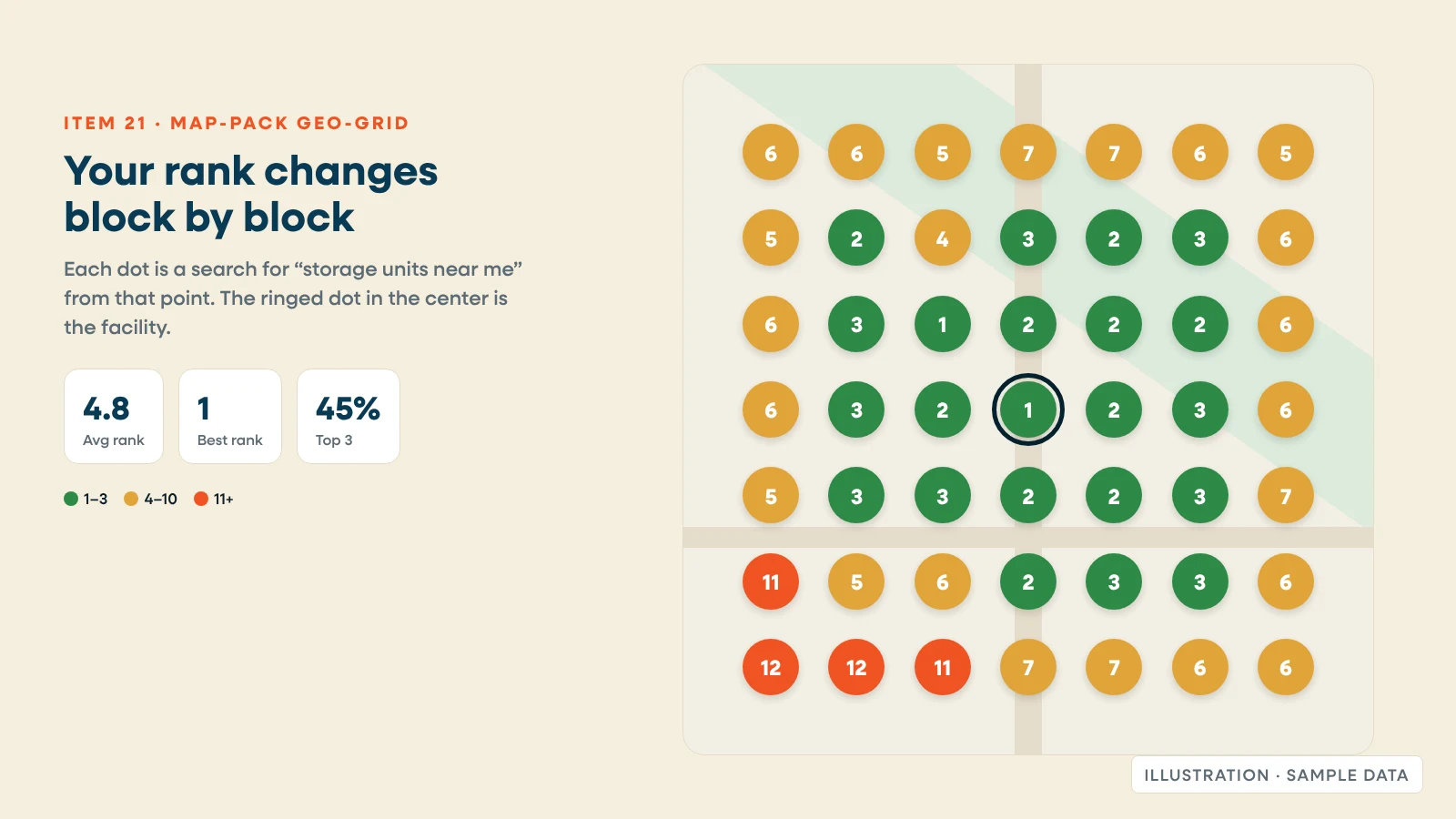
One ranking check from your office tells you little, because map results change block by block. A geo-grid checks your position from points across your trade area. Scorecard includes a local geo-grid, and the free one-location scan shows it.
22. Ask AI assistants what renters ask
Owner: you. Time: 15 minutes.
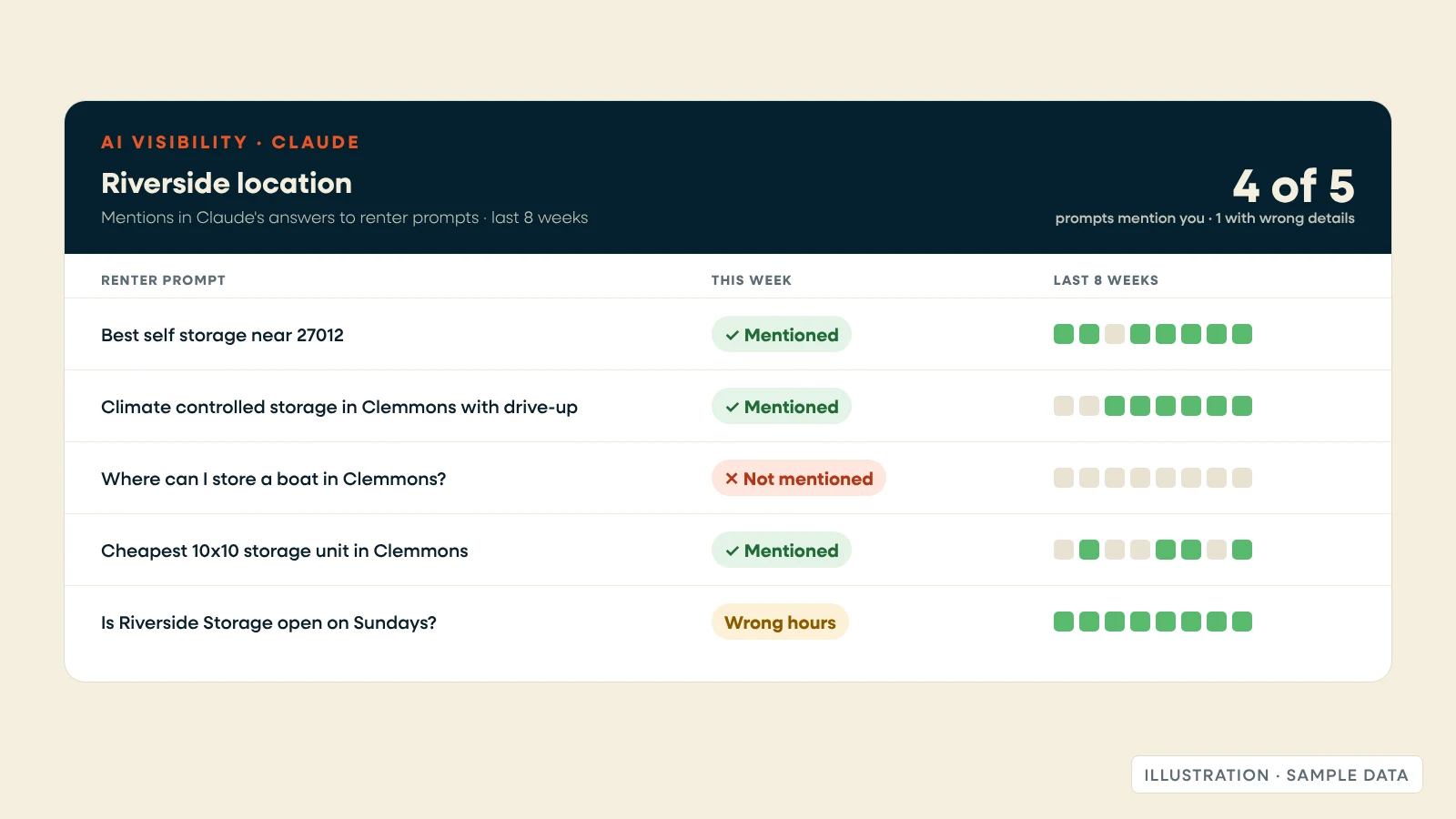
Run five prompts in Google AI Mode, ChatGPT and Claude, and note whether your facility comes up and whether the details are right:
- "Best self storage near [neighborhood or zip code]"
- "Climate controlled storage in [city] with drive-up access"
- "Where can I store a boat in [city]?"
- "Cheapest 10x10 storage unit in [city]"
- "Is [your facility name] in [city] open on Sundays?"
Wrong hours or prices in an answer usually trace back to item 12. Scorecard tracks whether Claude mentions your facility over time. Check the others by hand.
23. Keep each Google Business Profile current
Owner: you. Time: 15 minutes.
Add holiday hours before each holiday. Add two or three new photos. Answer new reviews and questions. Make sure promos on Google match the website.
24. Improve one page
Owner: you. Time: 20 minutes.
Pick the location page with the most impressions and the fewest clicks from item 19. Add one FAQ from this month's phone calls, update a photo, or tighten the title tag.
What about AI search?
You don't need a separate checklist. Google says "there are no additional requirements to appear in AI Overviews or AI Mode." A page needs to be indexed and eligible to show with a snippet, and "all existing SEO fundamentals continue to be worthwhile" (Google Search Central, updated December 2025).
For storage, that comes down to four items above. Units and prices in the HTML (item 4), so AI tools can quote them. Structured data that matches the page (item 8). Specific, plain-language location pages (item 14). And crawler access (item 16). Then measure it with item 22.
The full checklist at a glance
| # | Item | Owner | How often | Time |
|---|---|---|---|---|
| 1 | Pages crawled and indexed | Platform | Check quarterly | 5 min |
| 2 | One URL per page | Platform | Check quarterly | 5 min |
| 3 | One H1, unique titles | Platform | Check quarterly | 5 min |
| 4 | Units and prices in the HTML | Platform | Check quarterly | 10 min |
| 5 | Real links to every location | Platform | Check quarterly | 5 min |
| 6 | Core Web Vitals, including INP | Platform | Check quarterly | 10 min |
| 7 | Location, city, state pages from one source | Platform | Check quarterly | 5 min |
| 8 | Schema matches the page | Platform | Check quarterly | 5 min |
| 9 | Images compressed and described | Platform and you | Check quarterly | 5 min |
| 10 | Search Console and Bing verified | You | Once | 30 min |
| 11 | Google Business Profile per location | You | Once | 45 min per location |
| 12 | One source of truth for details | You | Once | 30 min per location |
| 13 | Keyword-to-page map | You | Once | 2 hours |
| 14 | Location pages worth reading | You | Once | 1 to 2 hours per location |
| 15 | Storage-type pages | You | Once | 1 hour per type |
| 16 | Search and AI crawlers allowed | You | Once | 15 min |
| 17 | Rentals tracked as conversions | You | Once | 1 hour |
| 18 | Pages dropped from Google | You | Monthly | 10 min |
| 19 | Queries by location | You | Monthly | 15 min |
| 20 | One page checked as Google sees it | You | Monthly | 5 min |
| 21 | Map-pack geo-grid | You | Monthly | 10 min |
| 22 | AI assistant prompts | You | Monthly | 15 min |
| 23 | Google Business Profile upkeep | You | Monthly | 15 min |
| 24 | Improve one page | You | Monthly | 20 min |
Download the checklist: Excel file. Free, no email required. It adds a "how to check" note, a status column and a notes column to every item.
Where Storagely fits
We built Storagely so that Part 1 is done before you log in.
- Core Site (every plan): location, city and state pages from your location records; sitemap, robots.txt and canonical tags; exactly one H1 per page.
- Units in the HTML: in native mode, unit sizes and prices are in the page when it loads.
- Schema (Essential and up, from $299 per location per month): SelfStorage, LocalBusiness, FAQPage and BreadcrumbList.
- Atlas: one record per location, synced with Google Business Profile.
- Scorecard: 19 reports, including rankings, a local geo-grid and AI visibility tracking in Claude.
- SEO Assist (custom quote): our team does the monthly SEO work, writes content, manages your Google Business Profiles, and sends a monthly report with a review call.
Prices are published on our pricing page (as of October 2026). We don't guarantee rankings, and you should be wary of anyone who does. See everything included on our self storage SEO page.
Your next step: Run the free Scorecard scan on one location. It checks search visibility, website health and rental friction, and it shows your score before asking for contact details.
Related reading: Self storage website best practices · How is AI search affecting your self storage site traffic? · The five self-storage website questions operators asked us most
Frequently asked questions
What should a self storage SEO checklist include?
Three groups. Technical items your website platform should handle, such as indexing, canonical URLs, one H1 per page, units in the HTML, Core Web Vitals and schema. Setup you do once, such as Google Business Profiles, unique location pages and storage-type pages. And monthly checks in Search Console, map-pack rankings and AI assistants.
How often should I do a self storage SEO audit?
Check the technical items once a quarter, and spend about 90 minutes a month per location on Search Console, rankings, AI answers and your Google Business Profile. Run a full audit after a site migration, a new location or a platform change.
Can Google see the units on my storage website?
Only if they're in the page Google renders. Paste a location page into URL Inspection in Search Console, run a live test, and search the rendered HTML for a unit size and a price. If they're missing, Google isn't seeing them.
What schema should a self storage location page use?
The schema.org SelfStorage type, a kind of LocalBusiness, with name, address, phone, hours and coordinates. Add BreadcrumbList for the page trail and FAQPage where the page shows a visible FAQ. The markup must match what's on the page.
How do I get my storage facility into AI search results?
Google says there are no extra requirements for AI Overviews or AI Mode beyond normal SEO. Make sure your pages are indexed, put units and prices in the HTML, keep details consistent, and let search crawlers such as Googlebot, Bingbot, OAI-SearchBot and Claude-SearchBot read your site.