ChatGPT now suggests products and businesses to people every day, just like Google. The question is whether your facility shows up in the results. On November 10th, 2026, OpenAI announced a way to give ChatGPT your facility’s details directly, instead of leaving it to piece them together from the web, through a ChatGPT business profile.
OpenAI's new Businesses in ChatGPT beta works a lot like Google Business Profile and Google Search Console rolled into one, built for the 1.2 billion people who use ChatGPT every week. It lets you claim a verified ChatGPT business profile for each facility, keep its details current, add product feeds with pricing and availability and see how people engage with you.
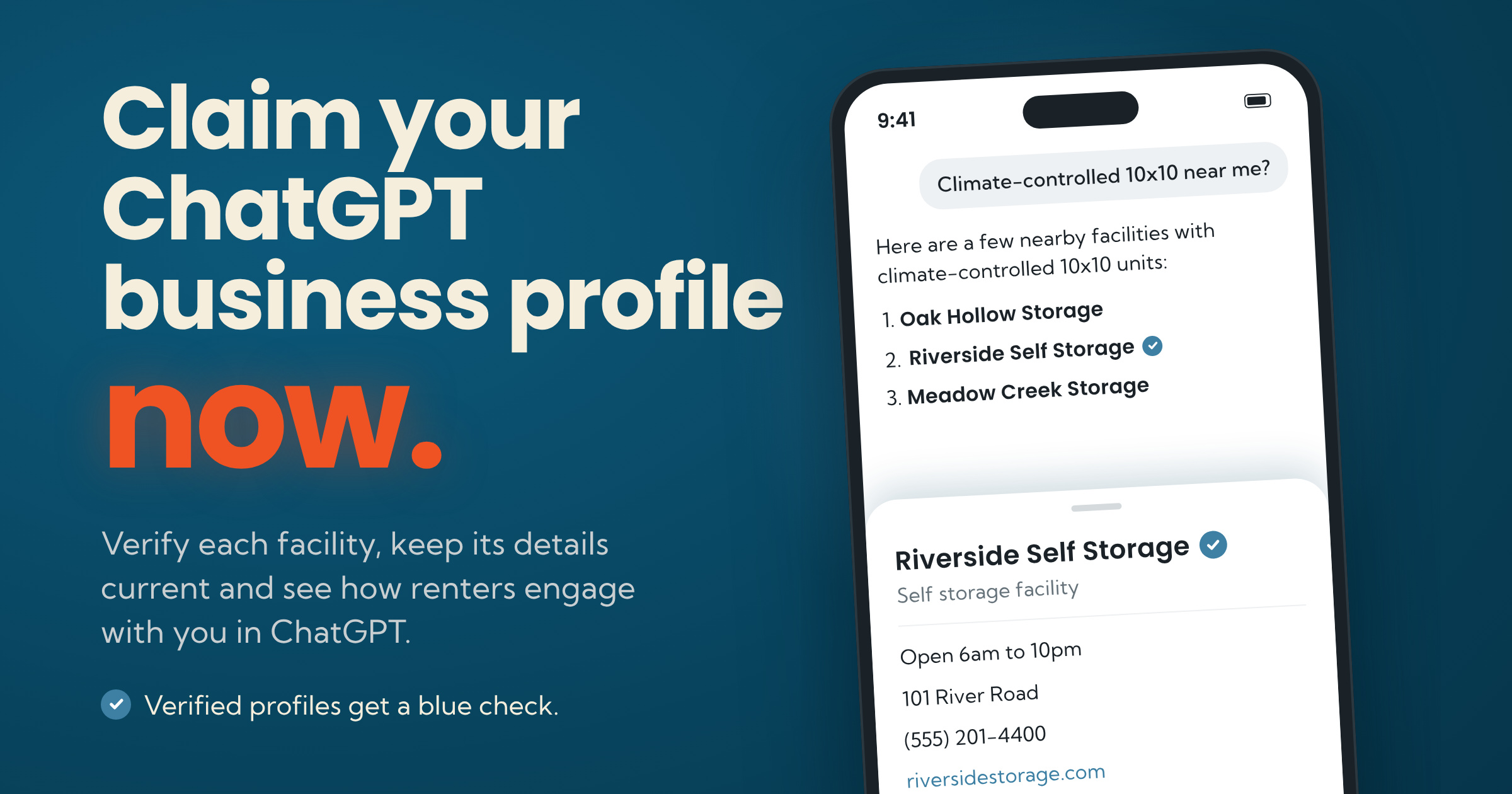
Picture a renter asking ChatGPT for a climate-controlled 10x10 near them. ChatGPT answers with a few facilities, and one has a blue check next to its name. Which one looks like the safe bet? A verified ChatGPT business profile lets you give ChatGPT your facility's details straight from you. Don't wait to claim your facilities’ profiles. Every location needs its own claim, and OpenAI reviews each one before approving it. The upside: You don't need an Ads account or an Enterprise agreement to start. Here's what a ChatGPT business profile includes, how to claim each location and why getting found is only half the job.
What a ChatGPT business profile gives you
Until now, ChatGPT pieced together your facility from whatever it found online, and the only fix for a wrong detail was chasing down every source. A claimed ChatGPT business profile gives you one place to correct it. Once a location is verified, you get:
A profile you control: Update your website, description, category and logo once your verification is approved.
A blue check: OpenAI adds a blue check next to your name after your identity verification is approved. Claiming alone doesn't add it.
Insights: See how people engage with your facilities in ChatGPT.
Product feeds: Add a product feed to your ChatGPT business profile with pricing and availability.
Where you'll manage it: Business Hub
Business Hub is OpenAI's new dashboard for businesses in ChatGPT. You claim and verify each facility's ChatGPT business profile there, edit its details, add product feeds and check your insights. Here's how it maps to Google's tools:
What you want to do | On Google | On ChatGPT |
Claim and edit your listing | Google Business Profile | |
See how people find and engage with you | Google Search Console and Business Profile insights | Business Hub insights |
See who visited your site and rented | Google Analytics | Your own website analytics (Business Hub doesn't show this) |
One limit to know up front: OpenAI doesn't share the actual conversations renters have in ChatGPT, and Business Hub won't tell you whether someone who found you there went on to rent a unit. Your own website analytics will, since that's where the rental happens.
OpenAI also launched Business Agents, a chat people can open from a business's profile. For now, only eligible US e-commerce and online service businesses can use them, so storage facilities can't add one yet.
The biggest addition to watch: Product feeds
Verified businesses can add product feeds with pricing and availability, and Business Hub says those products can show up right inside ChatGPT's answers when they match what someone is looking for, plus in your profile's side panel. For a storage operator, picture available units and rates appearing in the answer to "climate-controlled 10x10 near me." It could put your inventory, not just your name, in front of the renter. Keep in mind this is in beta: Whether unit pricing and availability can flow this way, and how it shows up in real searches, is still to be determined. We'll update this guide as we learn.
How to claim your facility in ChatGPT
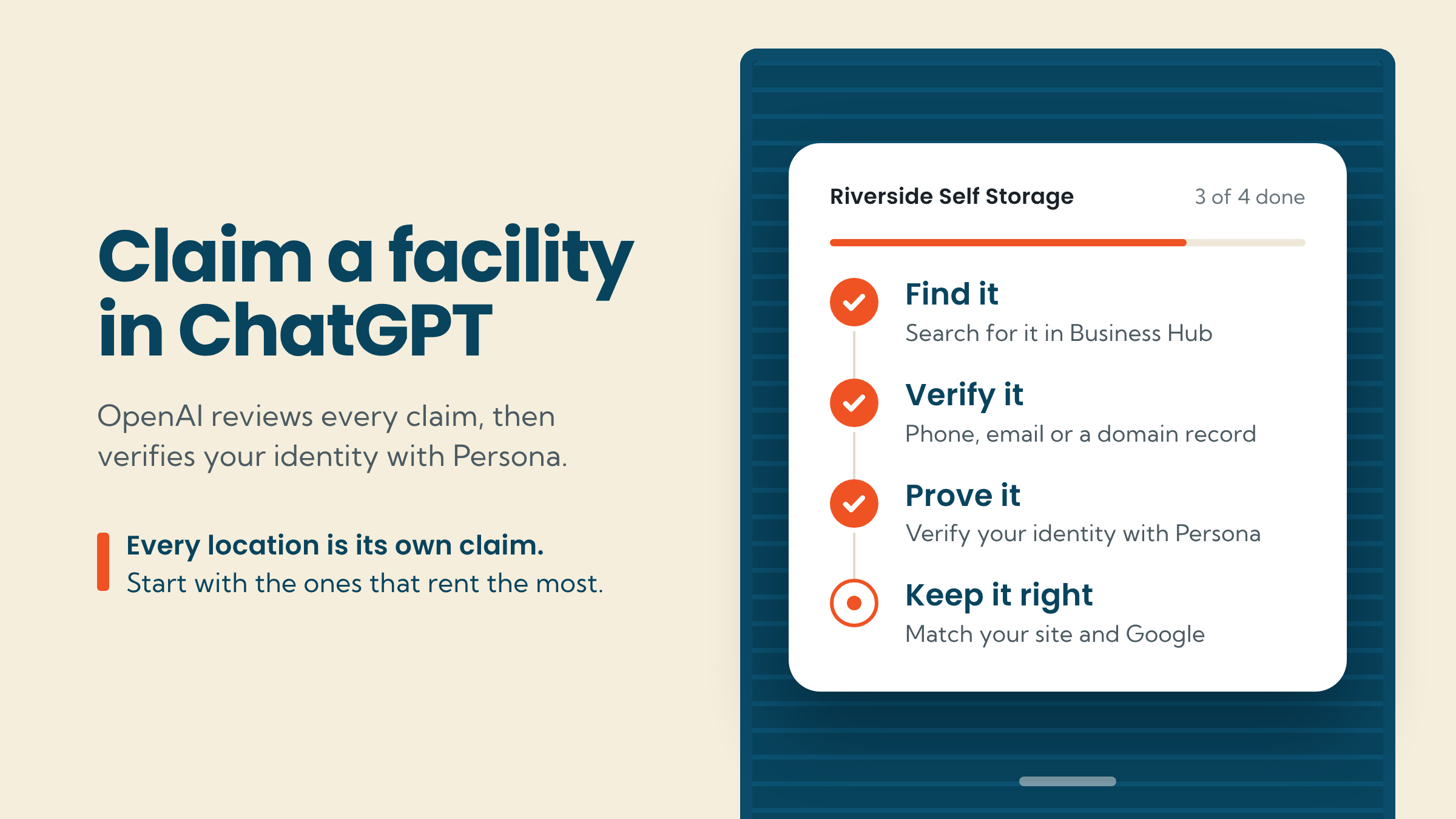
OpenAI walks through the process in its help article, Setting up your business on ChatGPT. Here's the short version for storage operators.
Find your facility: Sign in to ChatGPT and open Business Hub from the sidebar. Search for your facility by name and select the listing that matches. If you need help with access, select Contact support.
Confirm the account: Confirm the ChatGPT account you'll use to manage the facility's ChatGPT business profile. Pick one your company controls, not a manager's personal login that leaves if they do.
Verify your claim: Use one of the verification methods ChatGPT offers for your facility: Business phone (by text or automated call), business email or your website domain. For the domain, add the record ChatGPT gives you, then select Verify domain.
Wait for approval: OpenAI reviews your claim. Once it's approved, your facility's ChatGPT business profile shows up in your Business Hub.
Verify your identity with Persona: Persona is the ID-check service OpenAI uses. Open the Business tab, select your profile and find Complete verification with Persona. You need it to publish changes, view insights or create a business agent. Make sure your business name, address and any registration or tax number match your official records.
Review your business information: Once Persona approves you, update your website, description, category and logo, then open Insights.
Three things to know before you start
Every location is its own claim: OpenAI says each brand is managed separately, and claiming the main brand doesn't claim its locations. If you run 12 facilities, plan on 12 claims.
Claim existing listings only, for now: OpenAI says local stores and restaurants can currently claim only an existing US listing. Storage facilities will likely fall under that, so search for each one first.
Let ChatGPT read your site: OpenAI recommends allowing its search crawler, OAI-SearchBot, in your robots.txt file (the file that tells crawlers which pages they can read), and says sites that opt out won't be shown in ChatGPT search answers. Check your robots.txt before you claim.
What to do after you claim your ChatGPT business profile
Claiming won't move you up the list on its own: OpenAI says it doesn't guarantee higher placement or sales. What claiming does is give ChatGPT accurate details to work from when it does recommend you. Two habits help keep them accurate.
Make your info match everywhere. Your name, address, phone, hours and category should be identical in your ChatGPT business profile, Google Business Profile and your website. A stale listing elsewhere can contradict the ChatGPT business profile you just verified. On Storagely, keeping your website current is the easy part: Edit your Google Business Profile, and the change flows into Atlas, so your site updates too. You can also update hours, amenities and location details in Atlas for all locations, a group or a single location, and every page on your site updates. Your ChatGPT business profile lives separately in OpenAI's Business Hub, so make the same change there.
Check your insights against your analytics. Business Hub shows how people engage with your facility in ChatGPT. Compare it with your website analytics to see how much turns into rentals.
Getting found is half the job. Your website has to finish it.
A claimed ChatGPT business profile can help point renters to your facility. What happens next depends on your website, because AI assistants are starting to read sites on a renter's behalf: Find a unit, check the price, compare it with the facility down the road.
We put that to the test with Beacon, sending its AI agent to 1,412 storage location pages across 111 operator websites with one task: Find a unit and confirm the move-in price. 85% never gave it a price it could verify.
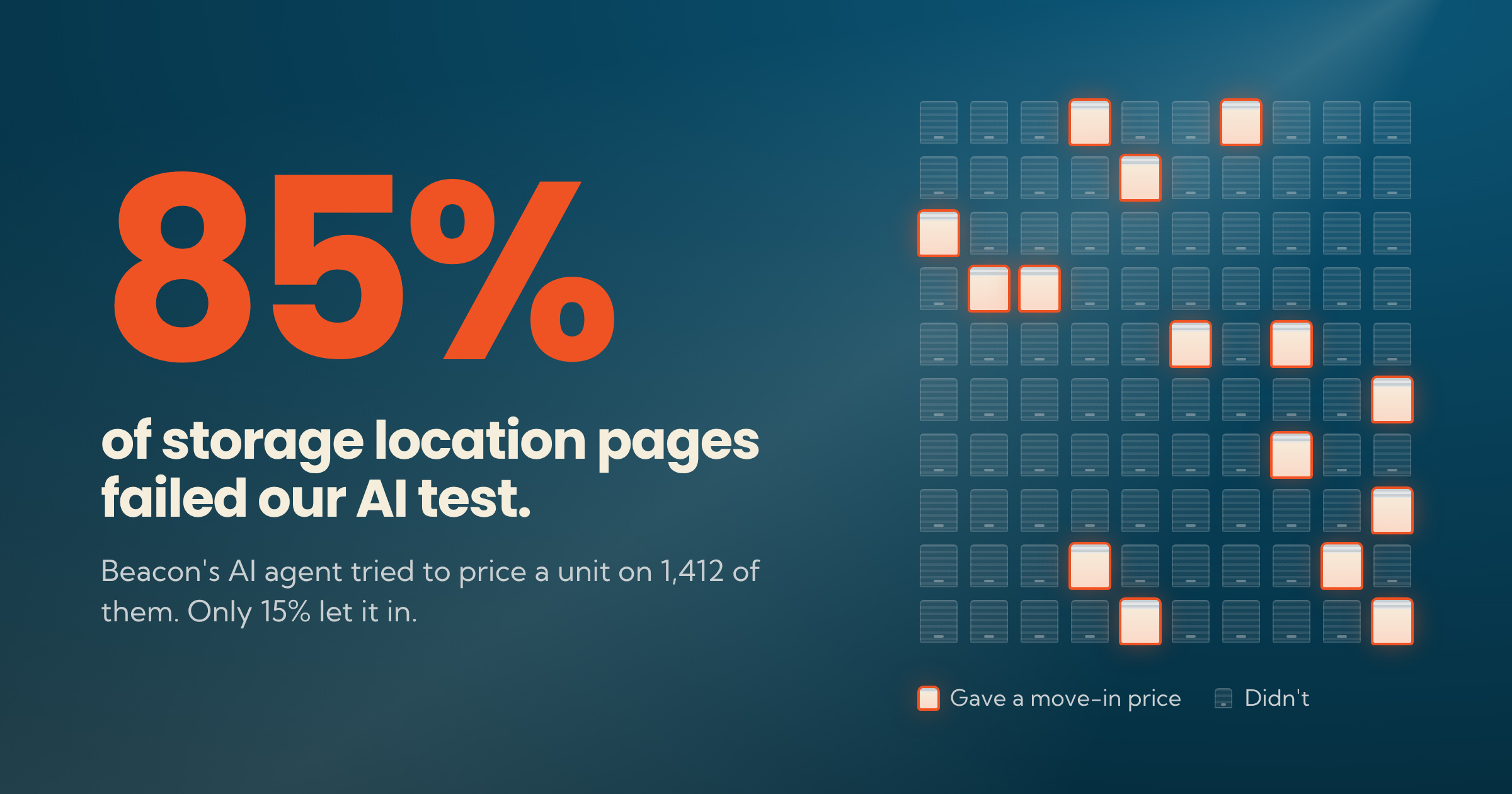
The agent got stuck on units it couldn't read, pricing behind contact forms and checkout totals that didn't match the advertised rate. Your next competitor might not have a better price. Their website might just be easier for AI to understand. Storagely websites are built for exactly this: Unit pages and checkout show sizes, prices and the move-in total, with rates synced from your management software.
Available Now: Beacon
Beacon is Storagely's all-in-one Generative Engine Optimization (GEO) tool. It goes past AI search visibility reporting (still included) to show how easily AI and AI agents can get the information they need from your site to suggest you over a competitor. Beacon pinpoints what needs to be fixed, and can apply those fixes for you or show you what needs to change. It's built right into Storagely, so what it finds won't sit in a spreadsheet waiting on someone to fix it.
Start by claiming a ChatGPT business profile for each facility. Then see what Beacon finds on your website.
Sources
OpenAI Help Center: Setting up your business on ChatGPT
OpenAI: Overview of OpenAI crawlers

Written by
Storagely